Most RAG systems do not fail at retrieval or generation. They fail much earlier, at document parsing. When documents are parsed incorrectly, structure breaks, context is lost, and even advanced language models produce unreliable answers. This is why many RAG pipelines struggle with hallucinations, irrelevant responses, and poor accuracy despite strong models and vector databases.
Document parsing is the foundation of any RAG system. It determines how information is extracted, structured, and retrieved. Poor parsing leads to weak chunking, low-quality embeddings, and inaccurate retrieval. Improving parsing often delivers faster performance gains than changing models.
In this article, you will learn how document parsing for RAG works, why it fails, which tools to use, and how to build a reliable, production-ready pipeline for complex documents.
TL;DR (Quick Summary):
Document parsing is the foundation of any RAG pipeline. Poor parsing leads to weak chunking, bad embeddings, and incorrect answers.
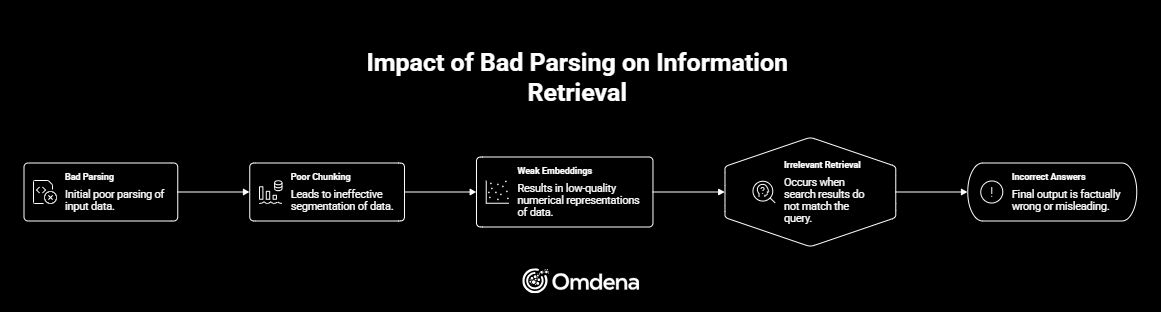
Most RAG failures follow this chain: Bad parsing → Poor chunking → Weak embeddings → Irrelevant retrieval → Hallucinations
Traditional PDF parsing fails on multi-column layouts, tables, and scanned documents. Layout-aware parsing solves this by preserving structure, hierarchy, and reading order.
Tools like Unstructured, LlamaParse, AWS Textract, and Google Document AI are commonly used, often in hybrid setups.
Intelligent chunking and evaluation metrics like Hit@k and MRR are critical for improving retrieval accuracy.
Improving document parsing for RAG often delivers bigger gains than switching to a better model.
What is Document Parsing for RAG?
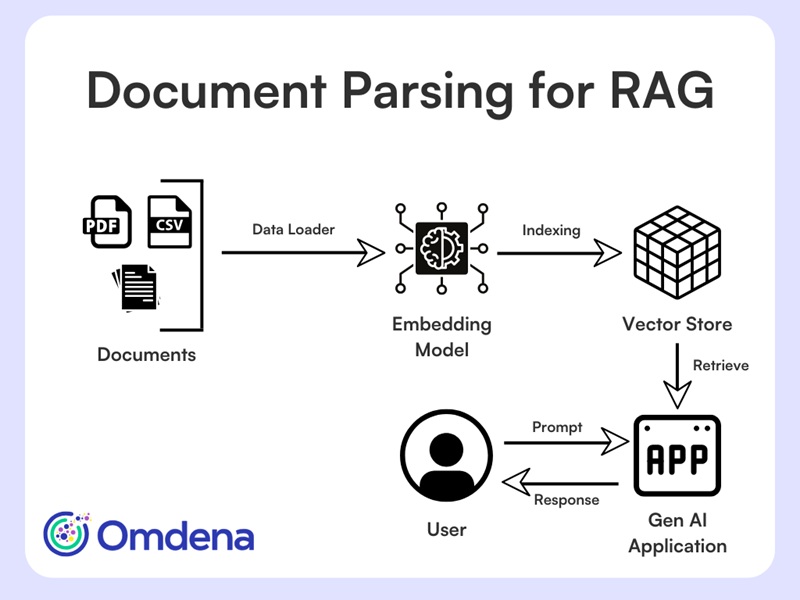
Document parsing for RAG is the process of converting raw documents, such as PDFs, reports, or structured data, into structured, semantically meaningful content that can be indexed, retrieved, and used by language models. It goes beyond simple text extraction by preserving structure, hierarchy, and relationships within the document, which are essential for accurate retrieval and generation.
Document Parsing for RAG – Architecture
In modern RAG pipelines, parsing transforms unstructured data into formats that downstream systems can understand and query effectively.
Since parsing is the first step in the pipeline, any errors at this stage directly affect retrieval and final outputs. This raises an important question: why does parsing fail so often in real-world RAG systems?
Why Document Parsing Breaks RAG Pipelines?
In many RAG systems, teams focus on models, prompts, or vector databases, but failures often begin much earlier. Document parsing determines how information enters the pipeline. When parsing is incorrect, everything that follows degrades in quality.
Parsing errors do not stay isolated. They propagate through the entire system:
For example, broken reading order or lost structure leads to chunks that lack meaning. Embedding models then encode incomplete context, which results in poor retrieval and unreliable responses. This is a primary reason behind hallucinations and low accuracy in production systems.
In many cases, improving parsing delivers bigger gains than switching to a better model. To understand why parsing fails so often, it is important to examine the types of complex documents RAG systems must handle.
Complex Document Types RAG Needs to Handle
Not all documents behave the same way in RAG pipelines. While simple, single-column PDFs are easier to process, real-world systems must handle complex, visually structured inputs where layout plays a critical role. These documents often combine text with tables, images, and hierarchical sections, which is where multimodal document parsing for RAG becomes increasingly important.
Common examples include:
Research papers and academic journals
Legal contracts and financial reports
Technical manuals and specifications
Invoices and forms
Scanned documents that require OCR
Dashboards, charts, and visual reports
Emails and HTML pages
These documents share traits such as multi-column layouts, dense information, and interleaved elements. In these cases, meaning depends on layout, not just text. This is exactly why traditional parsing approaches struggle, leading to common failures in RAG pipelines.
Why Traditional Document Parsing Fails?
Most RAG pipelines rely on basic PDF loaders such as PyPDF or PDFMiner. These tools flatten documents into plain text, ignoring layout, columns, and semantic block types like titles or tables. This works for simple PDFs but fails on text-rich documents. In multi-column layouts, standard parsers read across the page, mixing content from different columns. The result is jumbled text with lost meaning, which embedding models cannot fix.
The most common failures include:
Broken reading order: text from different columns gets mixed together
Lost hierarchy: headings and sections collapse into plain text
Poor segmentation: chunks split mid-sentence or merge unrelated content
Visual noise: headers, footers, and page numbers leak into the text
In RAG systems, these issues compound downstream and severely degrade retrieval quality. This is exactly where layout-aware document parsing becomes essential.
The Shift Towards Layout‑Aware Document Parsing
Layout-aware document parsing treats a document as a visual artifact, not just a text file. Instead of extracting raw strings, it identifies how information is organized on the page and preserves that structure for downstream use.
It typically:
Detects bounding boxes for semantic blocks
Classifies elements such as Title, NarrativeText, ListItem, and Table
Preserves spatial relationships and hierarchy
Outputs structured data enriched with metadata
This metadata, including page numbers, element types, and coordinates, enables explainable retrieval, easier debugging, better evaluation, and higher-quality chunking.
Traditional Parsing
Layout-Aware Parsing
Extracts raw text
Extracts structured elements
Ignores layout
Understands visual structure
Breaks reading order
Preserves reading flow
No metadata
Rich metadata (page, type, coordinates)
Layout-aware parsing is no longer optional. It is a prerequisite for production-grade RAG systems. Next, let’s understand how end-to-end document parsing pipeline for RAG looks like.
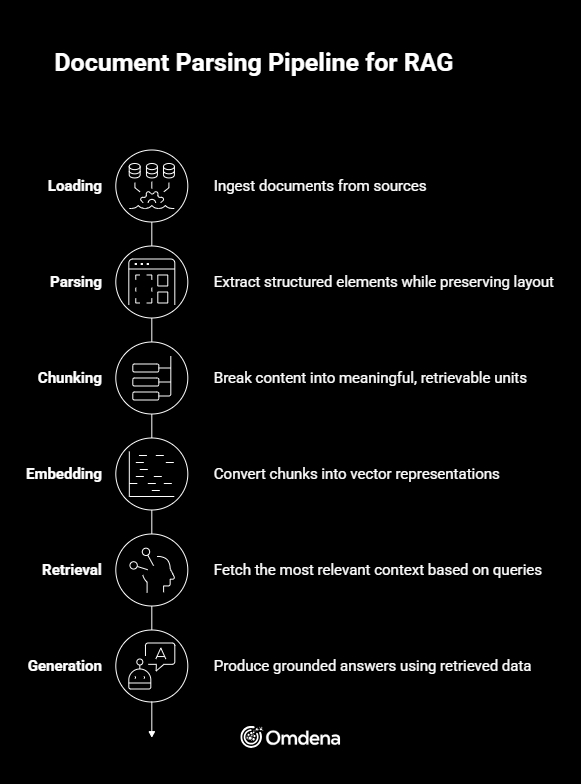
End-to-End Document Parsing Pipeline for RAG
A reliable RAG system depends on how well each stage of the pipeline is designed and connected.
Loading → Ingest documents from sources such as PDFs, databases, or APIs
Parsing → Extract structured elements while preserving layout and hierarchy
Chunking → Break content into meaningful, retrievable units
Embedding → Convert chunks into vector representations
Retrieval → Fetch the most relevant context based on queries
Generation → Produce grounded answers using retrieved data
Document Parsing Pipeline for RAG
Parsing directly impacts every downstream step in this pipeline. Once this foundation is clear, the next step is understanding how to implement layout-aware parsing effectively in real-world systems.
Implementing Layout-Aware Document Parsing in Practice
Once layout-aware document parsing becomes part of the pipeline, the next question is how to implement it reliably at scale. Modern RAG systems rely on a combination of rule-based parsing, machine learning models, and vision-language approaches, depending on document complexity and performance constraints.
Best Document Parsing Tools for RAG in 2026
As RAG systems evolve, document parsing has become a core part of the pipeline. Several tools are available, each suited for different document types, complexity levels, and scale requirements.
Tool
Best For
Strength
Limitation
Unstructured
General pipelines
Easy setup and structured output
Struggles with complex visuals and layouts
LlamaParse
Complex enterprise documents
High accuracy and strong structure preservation
Paid and API-based
AWS Textract
Forms and OCR-heavy documents
Scalable and reliable for structured extraction
Limited layout understanding
Google Document AI
Enterprise workflows
Strong OCR and document understanding capabilities
Expensive at scale
Azure Document Intelligence
Microsoft ecosystem
Seamless integrations and enterprise features
Requires post-processing for RAG use
Unstructured is a strong starting point for most pipelines, while LlamaParse is better for high-accuracy enterprise use cases. Cloud tools like AWS Textract, Google Document AI, and Azure Document Intelligence are useful for large-scale and OCR-heavy workflows.
No single tool fits all scenarios. Most production RAG systems use hybrid approaches to handle complex documents effectively.
Vision‑Language Models: “Seeing” the Document
An emerging approach uses vision-language models (VLMs) that process documents as images rather than plain text. Models such as LayoutLMv3, Donut, GPT-4.1 Vision, Llama 3 Vision, and Qwen2-VL reason over layout, tables, and mixed content using visual cues. These models are especially effective for scanned PDFs, complex tables, and documents with irregular layouts.
In practice, many teams adopt hybrid pipelines—using layout-aware parsers for efficiency and VLMs selectively for the most complex pages. Even with strong parsing models, reconstructing reading flow remains a separate challenge.
Reconstructing Reading Flow in Multi‑Column Layouts
Correctly reconstructing reading flow in multi-column documents requires understanding how text is arranged on the page. Instead of relying on raw text order, the process typically involves:
Clustering text blocks using spatial coordinates to group related content
Identifying column regions based on page layout and alignment
Ordering blocks top to bottom within each column to preserve natural reading flow
Merging columns in the correct sequence to reconstruct the full narrative
When this step is skipped or done poorly, even high-quality text extraction fails. For RAG systems, accurate reading order is essential to preserve meaning and ensure reliable retrieval.
Once the reading order is correctly reconstructed, the content finally reflects its intended structure. The next step is deciding how to break this structured content into units that can be effectively retrieved.
Intelligent Chunking for RAG Pipelines
Chunking determines how parsed content is broken into retrievable units, and it has a direct impact on retrieval accuracy. Many RAG pipelines begin with baseline chunking because it is easy to implement and works reasonably well for simple text.
Baseline Chunking
Most systems rely on:
Fixed-size chunks, defined by characters or tokens
Sliding windows with overlap to reduce context loss
This approach is predictable and fast. However, it is blind to document structure. Chunks may cut through sentences, merge unrelated topics, or separate headings from their content.
What Makes Chunking “Intelligent”?
Intelligent chunking uses document structure and metadata to preserve meaning. Instead of arbitrary splits, it:
Respects titles, sections, and paragraph boundaries
Avoids splitting semantic units mid-thought
Removes repeated headers and footers
Adapts chunk size based on content density
Enriches chunks with metadata such as page number, section, and element type
In practice, improving chunking often delivers bigger retrieval gains than switching to a larger model. The next section shows how these concepts translate into an end-to-end implementation.
From Theory to Code: A Reference Implementation
The concepts discussed above are not theoretical. They are implemented end-to-end in our workshop, which serves as a reference RAG pipeline for text-rich, multi-column PDFs.
This is where the pipeline becomes layout-aware instead of just “PDF-to-text”. The script uses Unstructured’s partition_pdf() with hi_res (when available) and falls back to fast if something fails.
Python
from unstructured.partition.pdf import partition_pdf

parse_kwargs = dict(
filename=str(PDF_PATH),
strategy=PARSING_STRATEGY, # "hi_res" preferred
infer_table_structure=True,
extract_images_in_pdf=False,
)

if PARSING_STRATEGY == "hi_res":
parse_kwargs["pdf_hi_res_max_pages"] = HI_RES_MAX_PAGES

try:
elements = partition_pdf(**parse_kwargs)
except Exception as e:
print("⚠️ hi_res parsing failed. Falling back to strategy='fast'.")
elements = partition_pdf(
filename=str(PDF_PATH),
strategy="fast",
infer_table_structure=False,
extract_images_in_pdf=False,
)
What you get back is not raw text. You get typed elements (Title, NarrativeText, etc.) with metadata like page numbers, gold for debugging and evaluation.
2. Parsed Elements → RAG Documents (preserving metadata)
The key here is that we do not throw away structure. We transform each parsed element into a LangChain Document and keep page_number + element_type.
Python
from langchain_core.documents import Document

docs = []
for el in elements:
text = (getattr(el, "text", "") or "").strip()
if not text:
continue

page_number = None
if hasattr(el, "metadata") and el.metadata is not None:
page_number = getattr(el.metadata, "page_number", None)

docs.append(
Document(
page_content=text,
metadata={
"source": PDF_PATH.name,
"page_number": page_number,
"element_type": type(el).__name__,
},
)
)
This design makes retrieval explainable (“why did the model answer that?”) because every chunk can be traced back to a page and element type.
The script uses a baseline splitter, but it doesn’t stop there; it prints diagnostics to expose over-chunking and noise.
Python
from langchain_text_splitters import RecursiveCharacterTextSplitter

text_splitter = RecursiveCharacterTextSplitter(
chunk_size=CHUNK_SIZE,
chunk_overlap=CHUNK_OVERLAP,
length_function=len,
)

chunked_docs = text_splitter.split_documents(docs)

lengths = [len(d.page_content) for d in chunked_docs]
print("min:", min(lengths), "max:", max(lengths), "avg:", sum(lengths)/len(lengths))
print("% very short (<150 chars):", sum(l < 150 for l in lengths) / len(lengths))
That last line is a practical trick: a spike in very short chunks often correlates with headers/footers and layout artifacts.
4. Embeddings + FAISS Index (local, fast, demo-proof)
Python
from langchain_openai import OpenAIEmbeddings
from langchain_community.vectorstores import FAISS

embeddings = OpenAIEmbeddings(model=EMBEDDING_MODEL)
vectorstore = FAISS.from_documents(chunked_docs, embeddings)

vectorstore = FAISS.from_documents(chunked_docs, embeddings)
print("✅ FAISS index created in memory.")

vectorstore.save_local(folder_path=str(FAISS_DIR))
print(f"✅ FAISS index saved to {FAISS_DIR}")

vectorstore = FAISS.load_local(
    str(FAISS_DIR), embeddings, allow_dangerous_deserialization=True
)
print("✅ FAISS index reloaded")
While FAISS is an excellent choice for local experimentation, workshops, and reproducible demos due to its speed and simplicity, production-grade RAG systems often rely on other vector stores depending on scale and operational needs. Common alternatives include Chroma for lightweight prototyping, Milvus and Weaviate for large-scale and metadata-rich retrieval, Qdrant for efficient vector search with strong filtering capabilities, and managed services like Pinecone when low-latency, zero-ops deployments are required. The choice of vector store should be driven by data volume, metadata complexity, and infrastructure constraints rather than embedding model selection.
5. Retrieval First, Then Generation (strict grounding)
A common mistake is to evaluate only the final answer. The script explicitly validates retrieval results (page + type), then runs the full RAG loop with a strict grounding prompt.
Python
user_query = "What ingredients are listed for Avocado Maki?"
k = 4

results = vectorstore.similarity_search(user_query, k=k)

print(f"Top {k} results for query: {user_query!r}\n")
for i, doc in enumerate(results, start=1):
    print(f"--- Result {i} ---")
    print("Page:", doc.metadata.get("page_number"), "| type:", doc.metadata.get("element_type"))
    print(doc.page_content[:600], "\n")
Python
llm = ChatOpenAI(model=CHAT_MODEL, temperature=0.1)
retriever = vectorstore.as_retriever(search_kwargs={"k": k})

prompt = (
    "You are answering strictly from the provided context. "
    "If the answer is not in the context, say you don't know.\n\n"
    "Question: {question}\n\n"
    "Context:\n{context}\n"
)

def rag_answer(question: str):
    docs_ = retriever.invoke(question)
    context = "\n\n".join(
        [f"[p.{d.metadata.get('page_number')}] {d.page_content}" for d in docs_]
    )
    msg = prompt.format(question=question, context=context)
    answer_ = llm.invoke(msg).content
    pages_ = sorted({d.metadata.get("page_number") for d in docs_ if d.metadata.get("page_number") is not None})
    return answer_, pages_, docs_

answer, pages, src_docs = rag_answer(user_query)
print("Answer:\n", answer)
print("\nSource pages:", pages)
This is the simplest, most effective anti-hallucination move: force grounding and surface provenance.
Even layout-aware parsing can include repeated page furniture. The script includes a lightweight heuristic to flag it.
Python
import re
from collections import Counter

def looks_like_header_or_footer(text: str) -> bool:
    lines = [l.strip() for l in text.splitlines() if l.strip()]
    if not lines:
        return False
    first = lines[0].lower()
    last = lines[-1].lower()
    return any(p in first or p in last for p in ["page", "confidential", "draft", "www.", "manual"])

def normalized_lines(text: str):
    return [re.sub(r"\s+", " ", l.strip().lower()) for l in text.splitlines() if l.strip()]
This is intentionally simple: fast signal beats slow perfection when you’re debugging a pipeline.
7. Retrieval Evaluation: Hit@k and MRR (quant, not vibes)
How do you prove that layout-aware parsing is superior? You must measure the retrieval phase using Information Retrieval (IR) metrics. In our workshop, we implemented an evaluation script to calculate:
Hit@k: The probability that the correct context is within the top k results.
MRR (Mean Reciprocal Rank): How high the correct answer ranks in the results.
Python
def eval_retrieval(test_set, k=4):
hits = 0
rr_sum = 0.0

for item in test_set:
q = item["q"]
exp = item["expected_page"]
retrieved = vectorstore.similarity_search(q, k=k)
pages = [d.metadata.get("page_number") for d in retrieved]

hit = exp in pages
hits += int(hit)

rr = 0.0
for rank, p in enumerate(pages, start=1):
if p == exp:
rr = 1.0 / rank
break
rr_sum += rr

hit_rate = hits / len(test_set)
mrr = rr_sum / len(test_set)
return hit_rate, mrr
Evaluating Parsing Before It Breaks Retrieval
Evaluation is often overlooked in RAG pipelines, yet it is essential. Many teams only evaluate final answers, even though most failures originate earlier during parsing and retrieval. Catching issues at this stage prevents wasted effort downstream and makes system behavior easier to explain and improve.
Qualitative Checks
Start with simple human inspection:
Do paragraphs read naturally from start to finish?
Are sentences complete and coherent?
Are columns clearly separated and ordered correctly?
Is document hierarchy—titles, sections, and lists—preserved?
These checks often reveal problems faster than automated metrics.
Noise Detection
Lightweight heuristics can quickly flag common parsing artifacts:
Repeated headers or footers
Page numbers embedded in content
Broken or partial OCR fragments
Removing this noise significantly improves chunk quality.
Retrieval-Level Metrics
Once documents are indexed, retrieval quality should be measured directly:
Hit@k: Is the correct context retrieved within the top k results?
MRR (Mean Reciprocal Rank): How early does the correct result appear?
These metrics are easy to interpret and immediately actionable.
Building Reliable RAG Systems Starts With Parsing
Modern RAG systems succeed or fail based on what they see. Layout-aware document parsing, correct reading order, intelligent chunking, and systematic evaluation form the foundation of reliable retrieval. When these steps are done well, models hallucinate less, retrieval becomes explainable, and answers remain grounded in source documents.
If you take one action after reading this article, run a layout-aware document parser on your most problematic PDF and inspect the output. The improvement is often immediate.
If you’re exploring how to build or improve a production-grade RAG system for complex documents, the Omdena team can help. Book an exploration call with Omdenato discuss your use case and see how layout-aware, human-centered AI systems can deliver reliable results at scale.
FAQ
What is document parsing for RAG, and why is it important?
Document parsing for RAG is the process of extracting, structuring, and organizing content from source documents before they are indexed for retrieval. It is critical because poorly parsed documents lead to broken retrieval, incomplete context, and hallucinated answers from language models. Strong parsing ensures that RAG systems retrieve accurate, well-structured information.
Why do traditional PDF parsers fail in RAG systems?
Traditional PDF parsers flatten documents into plain text and ignore layout, columns, and hierarchy. This causes mixed reading order, lost headings, broken chunks, and noisy text. In multi-column or text-rich PDFs, these issues severely degrade retrieval quality and cannot be fixed by embeddings or LLMs.
How does layout-aware parsing improve RAG performance?
Layout-aware parsing treats documents as visual artifacts rather than linear text. It detects semantic blocks, preserves reading order, and keeps metadata such as page numbers and element types. This results in cleaner chunks, better retrieval accuracy, explainable results, and fewer hallucinations in RAG systems.
What tools are commonly used for document parsing in RAG pipelines?
Popular tools include Unstructured for production-ready parsing, PDFPlumber for coordinate-level control, and ML-based approaches like LayoutParser or LayoutLMv3. Vision-language models such as Donut, GPT-4.1 Vision, and Qwen2-VL are often used for scanned PDFs and highly complex layouts.
How can teams evaluate whether document parsing is working correctly?
Teams should evaluate parsing before generation by reviewing reading order, hierarchy, and noise, then measuring retrieval quality using metrics like Hit@k and MRR. Qualitative checks combined with retrieval-level metrics help identify parsing issues early and improve overall RAG reliability.
Continue with Omdena
Share this article
Share on LinkedIn, send by email, or copy the direct link.